Assembly TV broadcasts TV program from Assembly computer festival starting Thursday 6. August 2009 in many channels (Internet, cable TV, DVB-H mobile television, 3G mobile video etc.).
The broadcast has for many years contained Scene Quiz Show (the name has varied somewhat over years). It involves three contestants answering questions related to the event, demoscene and computers. I have worked with that show many times. When the show started we needed the answering buttons and lights like any real TV quiz show has. I built the first light system based on some really old PC (Sinclair PC200). The answering buttons connected to RS-232 port handshaking line. The parallel port data pins were connected to drive Velleman K2634 four channel triac card that switched the mains power to lamps on and off. The software for the PC was written using Turbo Pascal programming language, it was a modified version of some of my light control software I used to control some lights on parties in the 1990′s. The system had three buttons for competitors and three corresponding light outputs. In addition there was a “effect” output that give power for few seconds after each keypress, that could be used to control light and sound effects that tell that one competitor has pressed button. The system was built up very quickly, but it worked well in live TV broadcast without any problems (other then I was the only I could set up the whole system correctly).
Some years later the system was updated. The new setup was built around old Toshiba T3200 classic laptop PC. The answering buttons were still connected to serial port like earlier but were made much better looking. The light controlling part was updated. The actual mains power controlling was handled by my four channel light dimmer that accepts standard 0-10V control signals. The 0..5V signals that come from PC parallel port were converted to 0-10V and isolated with help of Kemo M125 relay module that plugs to PC parallel port. This was proven to be a well working system that was used for many years to come. The show is going to air this year as well.
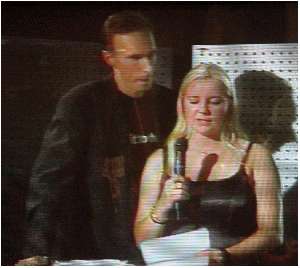
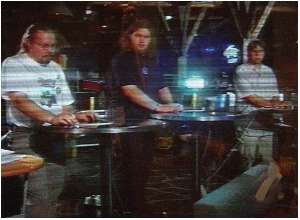
The following images are from year 2001 show where the quiz show light were used first time if I remember correctly (images from Byterapers gallery).
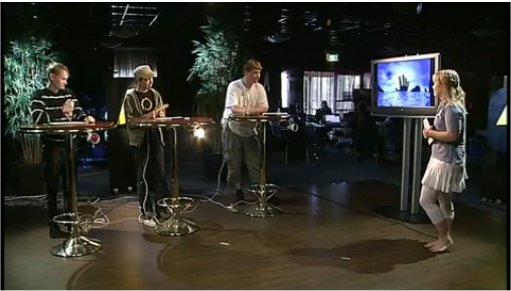
Here is one picture from summer 2009 broadcast. In this broadcast the hardware was mostly the same, but that old laptop was replaced with a newer PC running a new control software.
42 Comments
tomi says:
Open the picture with suitable OCR software.
Many computer scanners software suites include OCR software in them. So if you have a scanner then you could have software already.
Here are some free OCR links I found with Google (I have not tested the software mentioned in them):
http://weblogs.asp.net/jgalloway/archive/2006/10/01/Free-OCR-software_3F00_-You-may-already-have-it_2E002E002E00_.aspx
http://www.simpleocr.com/
Free-OCR.com claims to be a free online OCR (Optical Character Recognition) tool. You can use this to perform OCR on any image you supply.
http://www.free-ocr.com/
Another that OCRs some pages free is http://www.ocrterminal.com/
tomi says:
Icons are normally drawn with normal drawing programs same way as you draw pictures.
You just draw a small picture (the size of the icon) and then save it in suitable icon format (.GIF normally for web, some other format for Windows desktop icons).
tomi says:
This blog uses a custom visual theme.
tomi says:
When talking about computer security I would check and double check the security product I would use.
Big name security companies have reputation that they can be trusted.
I would not download and install a random product from web that is advertised as security products, because there are many products that claim to be security products that are actually something completely different (there are malware that is made to look like security product).
tomi says:
Yes. A virus can crash your computer to the point it won’t even turn on.
tomi says:
Get an external hard drive you can backup your data. Boot up your computer using a suitable clear operating system that can you can use to copy the data from existing hard disk to your external hard disk. Depending on the situation a Windows repair CD and/or a live Linux distribution (distribution like Knoppix or Ubuntu, booted from CD/DVD/USB) would be suitable repair tools.
tomi says:
It is quite typical nowadays that you do not receive anymore any install/repair CDs/DVDs with your computer.
But usually there is an option to create those CDs/DVDs yourself when you start using the PC (if this is the case the manual shoudl advice you to do that).
In case you don’t have those now, the option is to contact your computer manufacturer/representative and ask how to get those important CDs. It might be possible to get those later on from the manufacturer with some amount of money…
tomi says:
Sometimes when nothign normal like what you tried helps it is worth to try those bootable virus clear/emergency CDs that some companies make.
The idea is on those that you put a bootable CD with all the virus tools on your PC. You boot the PC from that CD (those are typically based on Linux operating system instead of Windows) so you boot a clear operating system without any viruses and other nasty things in it. Then the provided tools can be used to scan your computer hard drive for viruses and maybe even fix the problems (remove viruses etc..)…
I once years ago got one such CD for free on one computer fair, it was made by F-secure…
tomi says:
It is true that you can have viruses on your smartphones too.
I don’t know any anti-virus security program for Blackberry smartphones.
Blackberry smartphones are wery where I live. I live in Finland, and this is Nokia country.
tomi says:
If you format your hard disk and completely reinstall the operating system, there will not be any trojans or information that maybe was stored to them earlier.
If the trojan once got information from you, it is possible that it has sent that information to the “bad guys” out there… if your information has been copied to some to some other PC on the Internet, that information will still be at that other location no matter if you reinstall your PC, get a new PC or whatever…
tomi says:
That http://www.virustotal.com/ service looks interesting.
tomi says:
Use some suitable CD/DVD bootable operating system on the PC to format it. Some Linux live distribution would be suitable… I would first check Knoppix and Ubuntu live CDs and DVDs.
tomi says:
Subscribe to RSS feed
http://www.epanorama.net/blog/feed/
http://feeds.feedburner.com/TomiEngdahlsEpanoramaBlog