Everybody seems to be saying that you can’t charge Apple devices with normal USB power supplies. You need a special power supply from Apple or approved by Apple. I saw this kind of discussion at slashdot some time ago.
Usually, device makers need to sign a confidentially agreement with Apple if they want to say their charger ‘works with iPhone / iPod,’ and they’re not allowed to talk about how the insides work. I hate when manufacturers do crap like this to keep peripherals locked into a more profitable licensing agreement. Apples tendency toward total control is one of the things i don’t like about them. And many other manufacturers are just as bad. I wish companies would back off and be more open and/or use standard micro USB chargers.
The mysteries of Apple device charging article includes a 7-minute video we explore the mysteries of Apple device charging. The secret of Apple chargers is simple: just few resistors. If you don’t put these secret resistors on the data lines too, you get the dreaded Charging is not supported with this accessory. Those resistors like a way to signal to the iPhone that it can go ahead and “fast charge” by pulling 1A, or “slow charge” by pulling 0.5A. The iPhone needs to do a power negotiation to determine if the port is capable of providing 1000ma of power, because the upper-limit of a standard USB port is 500 mA. They just didn’t tell anyone about how to do that. I get why the resistors were initially added but I’m not understanding why it needs to be a trade secret.
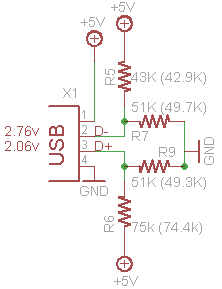
There is nothing to stop them just drawing the 500mA if the right sort of charger is not detected. Refusing to charge at all unless the licensed parts are present is pure market control, nothing else. Here is the resistor configuration for 500 mA charging:
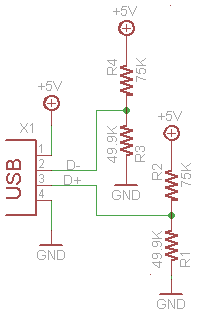
Resistance is Futile. The The mysteries of Apple device charging article demonstrates how anyone can make their own chargers that work with iPhone 4, 3Gs, etc. The pictures on this blog posting are from that article.
Apple devices are not the only one USB charged devices that can have some problems with USB chargers. So here are some resources on USB charging in general.
USB As A Power Source article gives an introduction USB Power Form.
European Commission has reached a voluntary agreement with some of the biggest names in the electronics industry to introduce a common charger for cell phones that fits all models. Information on this USB charging connector is available at USB Approved Class Specification Documents document directory. Read also Battery Charging v1.1 Spec and Adopters Agreement document.
Dealextreme USB charger discussion posting says that USB standard has 4 lines (+5V, ground and +/- data lines). Most USB chargers let the data lines float. Technically, the USB standard says that a USB charger should set the two data lines to specific voltages (~ 2V) to indicate how much power it can provide (I have not verified that from standards yet). The recent iPhones will not charge if the data lines are set incorrectly (i.e. not according to the USB standard).
USB Charging Guide comment: I believe having the data pins connected to each other is in the latest USB specification for charging. I had to interconnect the D+ and D- pins inside my USB AC charger to get it working with my Zune. Perfectly according specs but frustrating enough.
Wikipedia USB article: The USB 1.x and 2.0 specifications provide a 5 V supply on a single wire from which connected USB devices may draw power. The specification provides for no more than 5.25 V and no less than 4.75 V (5 V±5%) between the positive and negative bus power lines. For USB 2.0 the voltage supplied by low-powered hub ports is 4.4 V to 5.25 V.
A unit load is defined as 100 mA in USB 2.0, and was raised to 150 mA in USB 3.0. A maximum of 5 unit loads (500 mA) can be drawn from a port in USB 2.0, which was raised to 6 (900 mA) in USB 3.0.
All devices default as low-power but the device’s software may request high-power as long as the power is available on the providing bus.
In Battery Charging Specification, new powering modes are added to the USB specification. A host or hub Charging Downstream Port can supply a maximum of 1.5 A when communicating at low-bandwidth or full-bandwidth, a maximum of 900 mA when communicating at high-bandwidth, and as much current as the connector will safely handle when no communication is taking place (USB 2.0 standard-A connectors are rated at 1500 mA by default).
A Dedicated Charging Port can supply a maximum of 1.8 A of current at 5.25 V. A portable device can draw up to 1.8 A from a Dedicated Charging Port. The Dedicated Charging Port shorts the D+ and D- pins with a resistance of at most 200Ω. The short disables data transfer, but allows devices to detect the Dedicated Charging Port and allows very simple, high current chargers to be manufactured. The increased current (faster, 9 W charging) will occur once both the host/hub and devices support the new charging specification.
Without negotiation, the powered USB device is unable to inquire if it is allowed to draw 100 mA, 500 mA, or 1 A. Some non-standard USB devices use the 5 V power supply without participating in a proper USB network which negotiates power draws with the host interface
In most cases, these items contain no digital circuitry, and thus are not Standard compliant USB devices at all. This can theoretically cause problems with some computers; prior to the Battery Charging Specification, the USB specification required that devices connect in a low-power mode (100 mA maximum) and state how much current they need, before switching, with the host’s permission, into high-power mode.
USB Charging Guide tells some more details on mini-USB plug: the mini-USB plug actually has 5 pins in it. This can be important as the extra pin (Pin 4) USB_ID is usually either connected to ground or left floating. Sometimes a pull up resistor needs to be added to from the USB_ID to Pin 1 (VDD) to select “Device Mode” rather than “Host Mode”. This resistor is in the device side plug as the USB_ID pin is not wired through to the PC side connector. The good news is that quite a few USB cables have this. So sometimes you can get round the not charging problem simply by trying out different leads and one may work rather than buying the manufacturers “special” cable. On some Creative players you can also solve this by pulling down both data lines (with 2x15k resistors) at the source to emulate what the host (PC) does when setting line speed. This is not so common.
So the current state of USB charging is a little bit of mess…
220 Comments
Tomi Engdahl says:
Are three-way split cables safe to use for phone charging?
Question
With the iPhone 15 coming out soon I’m so ready to embrace the USB-C life and throw all my lightning cables in the big old garbaggio. My car only comes with one single USB-A port in the centre console box and the cigarette lighter outlet is completely broken. I was thinking about picking up one of those split USB-C cables with a USBA on one end and three USB-Cs on the other as this would finally solve arguments over who gets to charge their phone in my car. But after doing some research I’ve heard some questionable things about the safety of these cables. I’m willing to bet you all know more about this than me so I’m interested to hear your thoughts
https://www.reddit.com/r/UsbCHardware/comments/16hzjt0/are_threeway_split_cables_safe_to_use_for_phone/
Tomi Engdahl says:
Why USB-C Splitters Can Cause Magic Smoke Release
https://hackaday.com/2025/04/07/why-usb-c-splitters-can-cause-magic-smoke-release/
Using USB for powering devices is wonderful, as it frees us from a tangle of incompatible barrel & TRS connectors, not to mention a veritable gaggle of proprietary power connectors. The unfortunate side-effect of this is that the obvious thing to do with power connectors is to introduce splitters, which can backfire horribly, especially since USB-C and USB Power Delivery (USB-PD) were introduced. The [Quiescent Current] channel on YouTube recently went over the ways in which these handy gadgets can literally turn your USB-powered devices into a smoldering pile of ashes.
Much like Qualcomm’s Quick Charge protocols, USB-PD negotiates higher voltages with the power supply, after which this same voltage will be provided to any device that’s tapped into the power supply lines of the USB connector. Since USB-C has now also taken over duties like analog audio jacks, this has increased the demand for splitters, but these introduce many risks.
Why USB-C multiport adapters can be dangerous
https://www.youtube.com/watch?v=lvnoz5uaTwE
USB-C splitters or extensions can be convenient, but may also break your devices if used in the wrong combination. This can be annoying, but worst case dangerous if something gets hot or catches fire.
Comments:
Completely correct that they CAN be dangerous. They can also not be dangerous. I have a few of these adapters, that serves the same purpose as yours. Except the ones I have are a bit bigger, because they each have a built-in USB hub, that provides USB 3.0 or 3.1 speed on the secondary port. The primary port is the passthrough port for charging (up to 20V/100W on mine). The secondary port is a regular USB-C or USB-A port with just 5V output, because it goes through a voltage regulator either inside the USB hub chip or a separate one. I have one connected to my laptop at home, which provides power to my laptop, but the other USB port is connected to an USB-C 2.5G ethernet dongle.
Tomi Engdahl says:
How to Check Power Output of a USB Port on Windows 11
https://www.youtube.com/watch?v=GHLmHRqXi7U
In this video, Gokul shows you how to check the power output of a USB port on Windows 11. He walks you through two methods: one using the Device Manager and the other using a third-party application called USBDeview. Follow along to learn how to monitor the power state of your USB ports and ensure they’re functioning optimally.
Tomi Engdahl says:
Disaster of a product – so many things wrong
https://m.youtube.com/watch?v=pR8cMi67WNc
“There’s the earth wire. Ooh, it’s an empty wire!”
Tomi Engdahl says:
Does USB-A connector have the pins required for USB power delivery (PD)?
https://electronics.stackexchange.com/questions/446971/does-usb-a-connector-have-the-pins-required-for-usb-power-delivery-pd
Does a USB-A connector even have the pins required for negotiating power delivery (PD)? I know it can supply at least 5V voltage, but I’m not interested in that; I’m interested in power delivery standard with much higher voltages.
18
If one were to look long and hard enough for the specifications on USB Power Delivery version 1.0 then you will see a means by which a compliant source and sink could negotiate up to 20 volts at 5 amps on a USB-A connector. There were no extra pins for this negotiation, the communications was by BFSK modulated signals sent on the Vbus and Vgnd lines.
Use of USB-PD on USB-A was short lived, and I am not aware of seeing any devices that operated in this manner. One issue I heard was that the communication was not well isolated and so one device could have this power negotiation induced onto an adjacent port and that device would see it’s voltage change even though it made no such request. This could damage hardware. Another problem was that the cables would have to be certified for this higher voltages and current, meaning the cables would have to be built for this as well have a means for the USB controller to know that the cables met the spec.
USB-PD 1.0 was not required for USB-A but it was required for USB-C, and that likely affected adoption. USB-C had a different means to handle PD negotiation, the Configuration Channel, which used a different protocol called BMC. USB-C could optionally support BFSK on Vbus for communication with USB-A ports which meant that to assure compatibility the cables would have to translate the PD negotiation, or do no PD negotiation at all and supply only the default 5 volts.
At the same time USB-PD 1.0 was introduced so where a couple competing systems for negotiating power over USB-A. USB-PD was a bit late to the game and so QuickCharge and others took over that space. I believe that they simply negotiated the power over the USB D+/D- lines. This violated the USB spec, or perhaps not, and because it was in a grey area the USB specification enforcers could not, or would not, do much about it.
Not many people cared much of USB-PD until version 2.0 and it was required for USB-C. USB-PD v1.0 was technically supported but not much people even cared.
There was a power delivery extension to USB 2.0, however that was essentially just allowing USB 2.0 ports to provide a higher current (>2A), but still not exceeding 5V. That was possible based on using resistor values on the data lines to select power delivery current levels.
As far as I’m aware using USB-A connectors to deliver (or select) higher voltages is not possible under the official USB standard, power delivery or otherwise. To do so requires some other proprietary technology that deviates from the standard.
USB PD 2.0 had defined “PD Standard-A” and “PD Standard-B” connectors. These are of historical significance only, as USB PD standardization has basically washed their hands off type-A and type-B connectors, cables, etc.
The idea was that there could be “PD Capable” A-B cables, rated for 3A VBUS current.
These connectors did not have CC-like pins. The PD communications were supposed to be carried out via FM modulation on VBUS. That was a neat idea, but stillborn idea, since nobody apparently cared enough to push it on the market.
Tomi Engdahl says:
Millä tahansa USB laitteella voi ladata mitä vain. USB standardi (PD) määrittelee useita eri menetelmiä joilla laitteet adaptoituvat oikeaan virtaan ja joissain tapauksissa jännitteeseen.
Yksinkertaisin tapaus on joku laptopin USB laturi joka kykenee antamaan yli 100 W käyttäen suurempaa kuin 5V jännitettä. Kytkettäessä laturi vanhanaikaiseen 5V laitteeseen jännite jää tuohon 5V tasoon ja lopuksi ladattava laite päättelee laturin datapinnien tilan perusteella voiko ladata 500mA, 1.5A vai 3 A virralla. Ladattava laite siis päättää millä teholla lataus tapahtuu. USB A ja B liittimissä jos datapinnit ovat oikosulussa se kertoo ladattavalle laitteelle että voi imaista yli 500 mA virran. On myös muita tapoja kertoa tuo virran antokyky.
Kytkettäessä sama laturi laptoppiin USB-C liittimessä olevilla CC pinneillä laitteet kommunikoivat ja päättävät nostaa jännitteen ylemmäs jolloin suurempi teho, esimerkiksi 100W toteutuu. Laturi siis kertoo että se pystyy antamaan esimerkiksi 20V ja 5A ja samalla ladattava laite kertoo että 20 V on just fine hänelle eli antaa tulla vain. Lopuksi ladattava laite pyrkii nostamaan latausvirran 5A tasolle tosin se ei aina toteudu. Toteutuneeseen latausvirtaan vaikuttaa akun tila, lämpötila yms.
Vesa Eskola Asiahan ei valitettavasti ole noin. Mitä vain laitetta voi YRITTÄÄ ladata millä vain USB-C laturilla, mutta ei se tarkoita, että lataisi. Kaikissa latureissa ja USB-C laitteissa on piiri, joka kertoo toiselle osapuolelle, mitä jännitettä ja virtaa laite voi käyttää ja jos ei löydy yhteistä, ei lataaminen onnistu. Esimerkiksi simppeli puhelimen laturi voi antaa vain 5 V ja 12 V ja läppäri vaatii min. 20 V jännitteen, ei lataaminen onnistu. Ja vaikka oikea jännite löytyisi, voi homma tyssätä myös virran syötön riittämättömyyteen. Kaikki eivät siis toimi keskenään, se on väärää tietoa. Mitään vahinkoa ei tapahdu kylläkään, se on standardissa varmistettu
Jarno Vilen Jokainen standardia noudattava laturi antaa 5V/500 mA. Tietenkään laptop joka lataa vain 20V jännitteellä ei lataannu 5V jänniteellä. En niin ole väittänytkään, mitään ei kuitenkaan hajoa. No ehkä toi sanamuoto oli väärä,voi ladata pitäs olla voi yrittää ladata. Samoin joku älykännykkä ollessaan käytössä kuluttaa yli 500mA, jos laturi antaa vain 5V/500mA eli vain vbus näkyy laitteelle, akku kuluu mutta hitaammin kuin ilman laturia.
On myös latureita jotka eivät noudata standardia. Lueppas vielä kerran se kirjoittamani teksti ja kerro mikä kohta siinä on väärin.
Kaikissa usb-c laitteissa ei ole piiriä joka kommunikoi cc pinnien kautta, yksinkertaisimmissa on vastukset (Rp) jotka määrittävät miten paljon 5V jännitettä saa kuormittaa. 22k Rp -> 1.5A@5V ja vastaavasti 10k -> 3A. Kommunikoiva piiri tavitaan vain latureissa jotka nostavat jännitteen yli 5V tasolle power negotian käsittelyn jälkeen.
Olihan se mullekin pettymys kun kännykän 66W laturi ei lataa lainkaan thinkpadiä, syynä on laturin kyvyttömyys nostaa jännite tarpeeksi suureksi…silloin kun ne neuvottelevat voiko jännitteen nostaa laturi sanoo ettei onnistu.
Vesa Eskola “Millä tahansa USB laitteella voi ladata mitä vain.”. Tämä on väärin.
Vesa Eskola Ei tässä nyt mitään sen isompaa ole kuin se, että on hyvä, että ihmiset ymmärtävät, että kaikilla latureilla ja laitteilla EI VOI ladata kaikkia USB-C laitteita. Jos lähtee reissuun yhdellä laturilla, ei se takaa, että kaikki laitteet latautuvat. Eli se kannattaa varmistaa ensin. Tämä oli tarkennukseni syy, ei sinun arvosteleminen. Miten suomalaiset ottavat heti itseensä tällaisista? Heikolla täytyy itsetunnon olla.
https://www.facebook.com/share/p/1EjLFrD2mA/
Tomi Engdahl says:
Väärä USB-C-kaapeli vesittää tehokkaan pikalatauksen – tunnista sopiva
https://tekniikanmaailma.fi/vaara-usb-c-kaapeli-vesittaa-pikalatauksen-nain-tunnistat-sopivan/
Puhelinvalmistajat markkinoivat uutuuksiaan usein hurjilla pikalataustehoilla, jotka mahdollistavat latauksen vain kymmenissä minuuteissa. Moni kuitenkin saattaa pettyä, kun kotona lataus onkin odotettua hitaampaa.
Syynä voi olla latausjohto. Suuritehoinen lataus onnistuu vain soveltuvalla usb-c-kaapelilla. Valitettavasti usb-c-kaapelista ei aina välttämättä selviä, kuinka paljon tehoa ja dataa ne pystyvät siirtämään. Myyntipakkauksessa tiedot ovat näkyvillä ja joissain tapauksissa kaapeliin on myös kiinnitetty tiedot sisältävä tarra.
Tomi Engdahl says:
https://www.electricaltechnology.org/2026/02/plugging-a-usb-charger-into-another.html